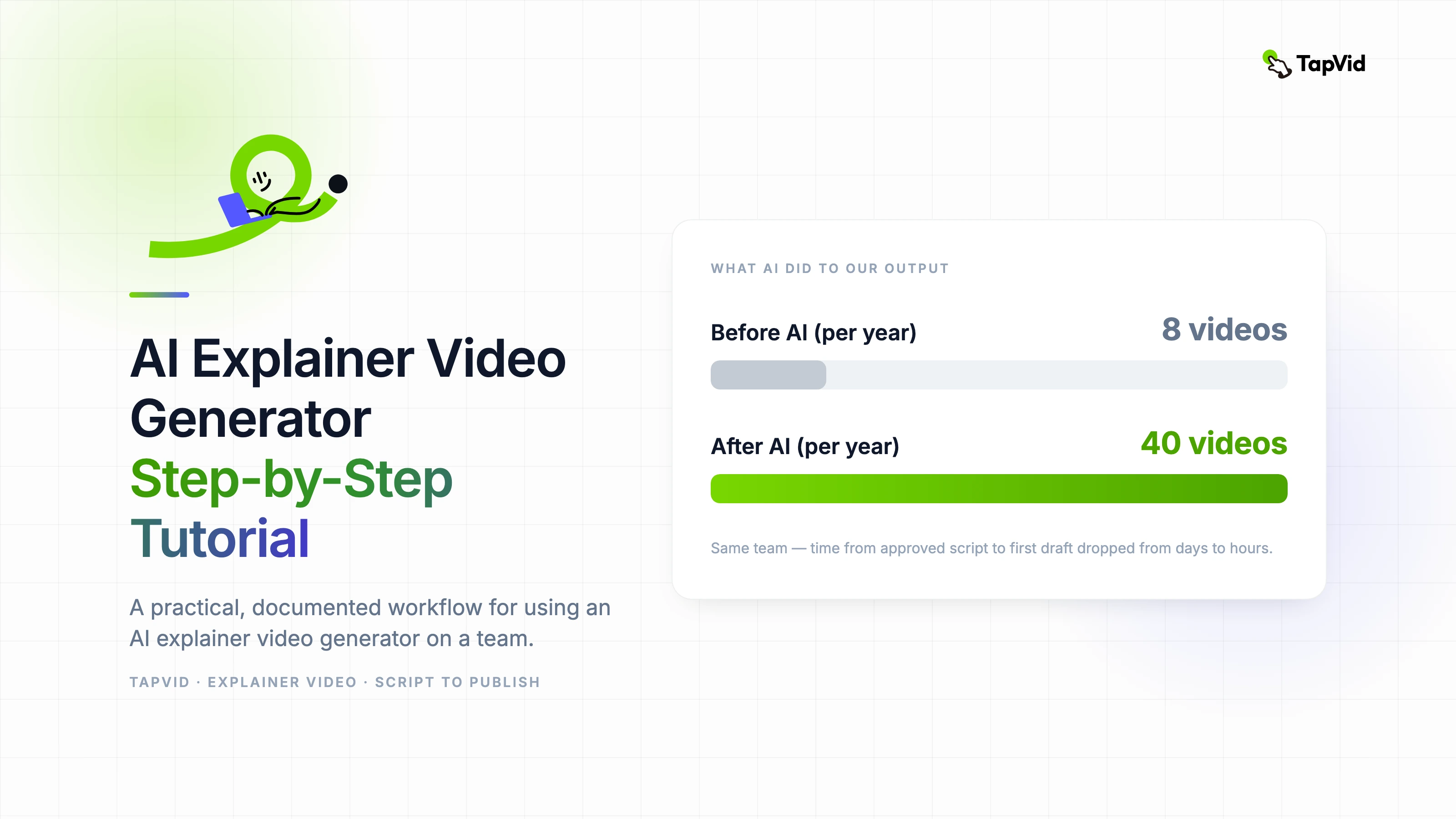

Our team produces around forty explainer videos a year. Two years ago that number was eight, and the bottleneck was always the same: the production process took too long relative to the value each video delivered. When we integrated an AI explainer video generator into the workflow, the number tripled — not because we hired more people, but because the time from approved script to first draft dropped from days to hours. This tutorial is our actual workflow, documented.
01
What makes an explainer video actually explain something
The word "explainer" gets used loosely. Most videos called explainer videos do not actually explain anything clearly — they describe a product, list features, or narrate a demo. A real explainer video answers a specific question a specific audience has, in a way that changes their understanding.
That distinction matters because it changes how you use an AI explainer video generator. The tool is not the challenge. The challenge is being clear about what you are explaining, to whom, and what understanding you want them to leave with. Every technical choice in the production follows from those answers.
Before you open any AI tool, write the core explanation in one paragraph. If you cannot write it in one paragraph, you are not ready to produce a video. The paragraph is your script outline, your creative brief, and your quality benchmark rolled into one.
02
Preparing your input for an AI explainer video generator
AI explainer video generators work best when the input is structured. A raw document pasted into a tool produces a mediocre output because the tool has to infer structure that you could have provided explicitly.
Format your input as a series of declarative statements, one per key point. Not flowing prose, not bullet fragments — complete declarative sentences that each make one claim. "X does Y by using Z" is a good structure. The AI can animate a clear declarative statement reliably. It cannot reliably extract the key point from a paragraph of flowing text.
Include your audience in the prompt or configuration. "Explain this to a marketing manager who is not technical" produces dramatically different output than "explain this to a software engineer." The AI adjusts vocabulary, analogy choices, and visual metaphor selection based on this context.
- Write core explanation in one paragraph first — this is your creative brief.
- Format key points as complete declarative sentences (not bullets or prose).
- Specify audience clearly: role, technical level, prior knowledge.
- Define the one action you want viewers to take after watching.
- Set maximum length before generating: 60 seconds, 90 seconds, 3 minutes — decide first.
03
Step-by-step: generating your first explainer video with AI
Step one: write your one-paragraph core explanation and the five to seven declarative statements that support it. This is your script skeleton.
Step two: input the skeleton into your AI explainer video generator. Do not paste a full document. Paste the skeleton. Add your audience definition and desired tone (professional, conversational, technical) to the configuration.
Step three: review the first output for structure before style. Does the video cover all five to seven points in the right order? Does each scene make exactly one point? Is the pacing consistent with the complexity of each point? Fix structural issues before worrying about visual choices.
04
Reviewing and refining AI explainer video output
The review process for AI explainer video output should be sequential, not simultaneous. Evaluate structure first, then pacing, then visuals, then audio. Trying to evaluate everything at once causes you to miss structural problems because you get distracted by visual ones.
Structural review: does each scene make one clear point? Does the sequence of points follow logical order? Is there a clear opening that establishes the problem and a clear closing that confirms the solution?
Pacing review: watch the video at 1.25x speed. If it still makes sense, the pacing is too slow for your target audience. Watch it at 0.75x speed. If you feel rushed, the pacing is too fast. The right pacing feels slightly rushed at normal speed — attention spans are shorter than most content teams assume.
05
Common mistakes teams make with AI explainer video generators
- Explaining too much: try to cover everything about a product instead of answering one specific question.
- Generic audience definition: "our customers" instead of "a marketing manager evaluating tools for a 10-person team."
- Accepting first output as final: AI explainer video output requires structural review before delivery.
- Ignoring audio quality: if the AI-generated voiceover mispronounces a product name or key term, fix it — that error undermines credibility immediately.
- No clear CTA: the video ends without telling viewers what to do next. One specific action, clearly stated.
06
Measuring whether your explainer video actually explains
Watch completion rate and the click-through rate on whatever CTA follows the video are the two most direct performance indicators. A video with high completion but low CTA clicks means the explanation landed but the call to action failed. A video with low completion means the explanation itself is not working.
The best measurement, when accessible, is a short comprehension check: ask viewers one question about what the video explained. If a meaningful percentage cannot answer it correctly, the explainer did not explain. Adjust the structural clarity before testing distribution strategies.
AI explainer video generators accelerate iteration significantly. A video that is not working can be regenerated from an improved script skeleton in hours rather than days. Treat your first published version as version one, not final — the performance data will tell you what to improve.